

Vesting contracts
A vesting contract is a financial agreement that outlines how and when an individual earns rights to certain assets over a specified period. On TON, vesting contracts enable secure, scheduled distribution of Gram assets with built-in staking capabilities.
What is vesting
Vesting is a mechanism that locks assets for a defined period and gradually releases them according to a predetermined schedule. Traditional vesting includes a cliff period where no rights are granted initially, followed by gradual vesting over time.
On TON, vesting contracts function as smart escrow services that lock Gram and release it according to configurable parameters. These contracts also support staking locked funds, allowing recipients to earn rewards while tokens remain locked.
How staking works with vesting
When funds are locked in a vesting contract, they cannot be sent to arbitrary addresses until unlocked. However, the contract supports a whitelist mechanism that allows sending locked funds to specific, approved destinations—primarily for staking purposes.
The vesting sender controls which addresses can receive locked funds by adding them to a whitelist. This security measure ensures that locked funds can only move to trusted, verified contracts that support staking operations.
Once whitelisted, locked funds can be staked through various methods:
- Direct validation through the system Elector
- Single nominator pools
- Liquid staking protocols
- Standard nominator pools
Staking rewards accumulate normally and remain accessible even while funds are locked. The vesting contract enforces restrictions only on destinations, not on the funds themselves once they are staked.
Contract capabilities
A vesting contract operates with two key roles:
Vesting sender: The entity that creates the contract and locks the funds. The sender can:
- Add addresses to the whitelist at any time
- Receive funds back to their address at any time (even if locked)
- Cannot remove addresses from the whitelist once added
Owner: The recipient of the vesting contract who can:
- Send funds from the contract to whitelisted addresses or the sender address
- Send unlocked funds to any address after the vesting period ends
- Stake funds through approved methods
The contract maintains a whitelist of approved destinations. Funds can be sent to whitelisted addresses even while locked, enabling staking operations. Once unlocked, funds can be sent anywhere without restrictions.
Unlock mechanism
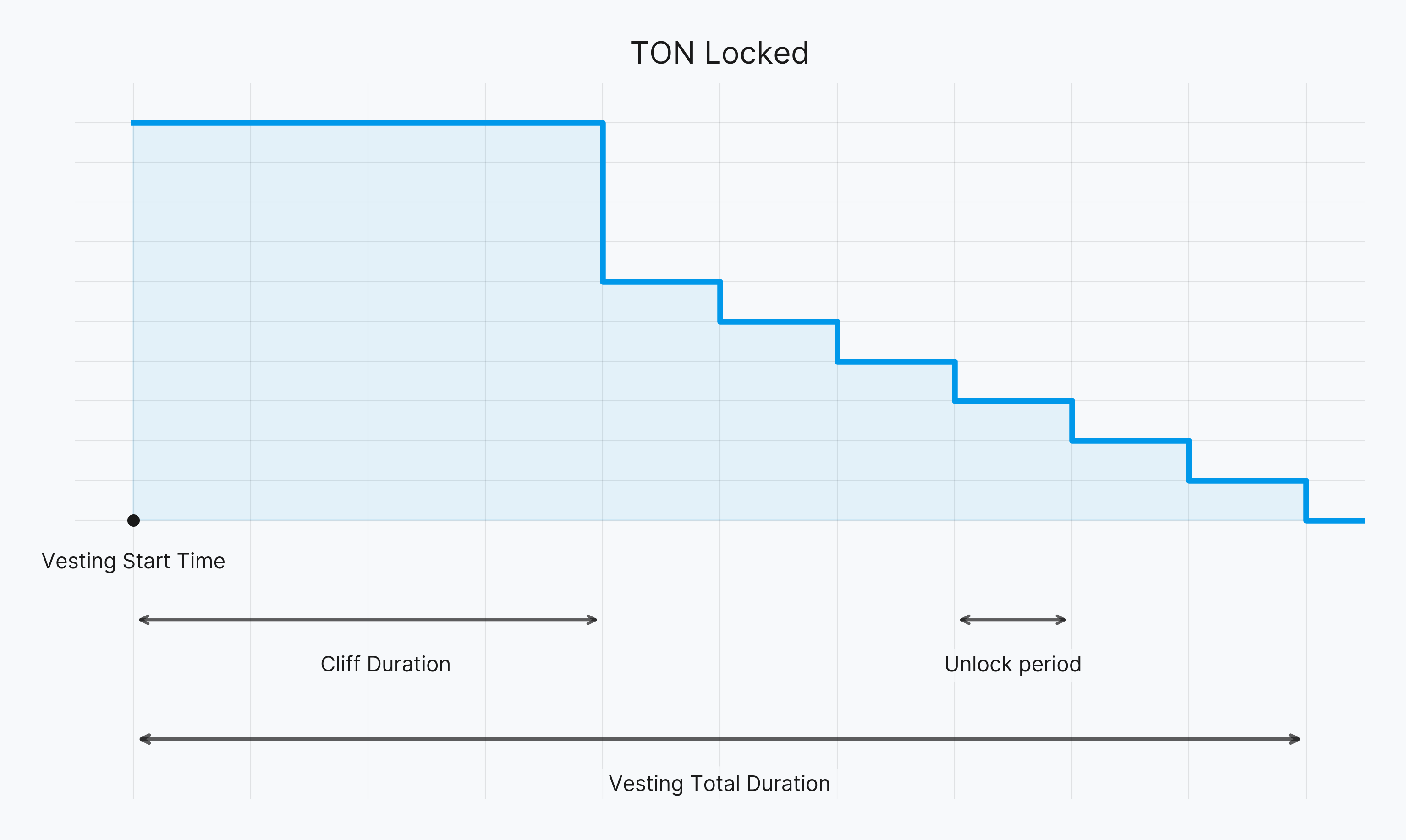
The vesting contract uses a time-based unlock schedule with these parameters:
- Vesting start time: Unix timestamp when the vesting period begins
- Total duration: Total vesting period in seconds (e.g., 31,104,000 for one year)
- Unlock period: Time interval between releases in seconds (e.g., 2,592,000 for monthly)
- Cliff duration: Initial lock period before the first release (e.g., 5,184,000 for two months)
Before the vesting start time, all funds are locked. After the start time, funds unlock proportionally according to the schedule. If a cliff period exists, nothing unlocks during that time. Once the cliff ends, funds unlock according to the formula.
Example: With a total duration of 10 months, unlock period of 1 month, and total amount of 500 GRAM, the contract unlocks 50 GRAM each month. If a 3-month cliff exists, nothing unlocks for the first 3 months, then 150 GRAM unlocks at once, followed by 50 GRAM monthly.
Use the get_locked_amount(int at_time) method to calculate how much remains locked at any specific time.
Deploy and verify a vesting contract
Deploying a vesting contract requires careful verification before sending funds. Follow these steps:
Step 1: Prepare recipient wallet
The vesting sender requests the recipient's TON wallet address. If the wallet is not deployed, the sender transfers 1 GRAM to the recipient and requests they send it back. This verifies wallet access and ensures deployment.
Step 2: Create the vesting contract
- Visit vesting.ton.org
- Enter the recipient's wallet address in the "Address" field
- Select "Create new vesting for this user"
Step 3: Configure vesting parameters
Provide these details:
- Vesting start date: Choose a deferred date for lockup without accumulation before the date
- Total amount: Total vesting amount in GRAM
- Total vesting duration: Duration in days (including cliff), e.g., 760 days for 2 years
- Cliff duration: Period in days after vesting starts when vesting accumulates but cannot be withdrawn (zero if no cliff)
- Unlocking frequency: Frequency in days (equal to total duration if no partial unlocking), e.g., 30 days for monthly
- In masterchain: Check this if direct validation from the vesting wallet is required. Direct validation means participating in the blockchain's proof-of-stake consensus as a validator with a stake of 300,000 GRAM or more
- Whitelist addresses: Add addresses for staking contracts (e.g., single nominator pool addresses)
Constraints:
- Total vesting duration must be divisible by unlocking frequency
- Cliff duration must be divisible by unlocking frequency
Step 4: Deploy and verify
- Select "Create" to generate the vesting wallet contract (costs 0.5 GRAM)
- The vesting wallet page opens after creation
- Verify all parameters are correct before proceeding
- Share the link with the recipient so they can verify parameters
Step 5: Verify contract code hash
Before sending funds to the deployed contract, verify the contract code hash matches the official version:
Official vesting contract code hash: b48b531abec3b714638291f7d77ed6dc9f6a2729efca20477137374d4ae8b590
To verify:
- Open the vesting contract address in a block explorer
- Check the contract code hash
- Verify it matches the official hash above
Security: Verify code hash
Never send funds to a vesting contract until the code hash is verified to match the official version. A mismatched code hash indicates a modified or malicious contract that could steal funds.
Step 6: Verify parameters via get-method
After deployment but before sending funds, verify all parameters using the get_vesting_data() get-method:
- Confirm all time parameters match expectations
- Verify sender and owner addresses are correct
- Check that duration constraints are satisfied
Step 7: Send funds
Only after verification is complete, send the vesting amount to the contract address from any wallet.
Reviewing contracts for whitelist
Before adding any address to the whitelist, verify the contract is legitimate and safe:
- Check contract verification: Use a block explorer to verify the contract is verified and matches known contract code hashes
- Verify contract type: Confirm the contract is one of the supported types (single nominator pool, liquid staking protocol, etc.)
- Review contract source: If available, review the contract source code or audit reports
- Check operational history: Review the contract's transaction history for suspicious activity
- Verify addresses: Double-check addresses match official documentation from the protocol
Supported whitelist destinations include:
- System Elector address (
-1:3333333333333333333333333333333333333333333333333333333333333333) - System Config address (
-1:5555555555555555555555555555555555555555555555555555555555555555) - Single nominator pool contracts
- Liquid staking protocol contracts
- Standard nominator pool contracts
Technically, any address can be added to the whitelist, including regular wallet addresses like wallet-v4. However, adding a wallet address defeats the purpose of vesting, as the owner would be able to withdraw locked funds immediately. Whitelist addresses should only include contracts that support staking operations and cannot be used for direct withdrawals.
Whitelist security
Once an address is added to the whitelist, it cannot be removed. Review all addresses carefully before adding them. Only add addresses from trusted, verified protocols.
Sending messages via UI
The vesting contract can be managed through the vesting.ton.org interface:
-
Open the vesting contract page using the shared link
-
Connect the owner wallet
-
Select "Send from Vesting" to create a new transaction
-
Enter the destination address
-
Enter the amount
-
For staking operations, add the appropriate message body:
- Empty message for single nominator pools
- Text comment "d" for standard nominator pools (deposit)
- Text comment "w" for standard nominator pools (withdraw)
Select the message format: Text, Base64, or HEX. Use Text for simple text comments, and Base64 or HEX for serialized BoC messages (e.g., deposit operations).
-
Review and confirm the transaction
The interface handles message formatting automatically, ensuring compliance with whitelist restrictions.
Security measures
Vesting contracts include multiple security layers:
Whitelist restrictions
Messages sent to whitelisted addresses must:
- Use
send_mode == 3only - Be bounceable (non-bounceable messages are rejected)
- Include no
state_initattachments
Operation restrictions
The contract enforces specific operation codes based on the destination address:
System Elector address:
op::elector_new_stake(0x4e73744b)op::elector_recover_stake(0x47657424)op::vote_for_complaint(0x56744370)op::vote_for_proposal(0x566f7465)
System Config address:
op::vote_for_proposal(0x566f7465)
Other whitelisted addresses:
- Empty messages (no body)
- Text comments where the first character is "d", "w", "D", or "W"
- Operation codes:
op::single_nominator_pool_withdraw(0x1000)op::single_nominator_pool_change_validator(0x1001)op::ton_stakers_deposit(0x47d54391)op::jetton_burn(0x595f07bc)op::ton_stakers_vote(0x69fb306c)op::vote_for_proposal(0x566f7465)op::vote_for_complaint(0x56744370)
Lock protection
The contract reserves locked funds when sending to non-whitelisted addresses (except the sender address). This prevents accidental loss of locked funds while allowing approved staking operations.
Sender address safety
Funds can always be sent back to the vesting sender address without restrictions, even if locked. This provides a safety mechanism to return funds if needed.
Protect owner wallet
Back up the recovery phrase for the owner wallet that controls the vesting contract. If access to the owner wallet is lost, control over vesting funds cannot be recovered.
Staking options
Vesting contracts support multiple staking methods. Each method has specific requirements and limitations.
Direct staking
Use the vesting contract directly as a validator wallet.
Requirements:
- Vesting contract must be deployed in masterchain
- Elector address must be whitelisted
Steps:
-
Request whitelisting of Elector address:
-1:3333333333333333333333333333333333333333333333333333333333333333 -
Import the private key and vesting address into MyTonCtrl and use it as a standard wallet-v3.
Important: Direct staking does not use owner wallet contract for management. Instead, it uses the vesting contract's public key and private key directly. By default, vesting.ton.org sets the vesting contract's public key to match the owner wallet's public key. Therefore, when importing into MyTonCtrl, use the seed phrase from the owner wallet.
Advanced: Advanced users can deploy a vesting contract with a different public key than the owner wallet to avoid using the same seed phrase on the validator node. This requires using deployment scripts from the vesting-contract GitHub repository. When deploying with a custom public key, use the seed phrase corresponding to that public key when importing into MyTonCtrl.
-
Adding the Config address to the whitelist is not required for basic staking operations.
-
To vote on configuration proposals, request whitelisting of the Config address:
-1:5555555555555555555555555555555555555555555555555555555555555555
Limitations: Requires storing the vesting private key on the validator node, which increases security risk.
Single nominator pool
Create a single nominator pool and stake through it. This is the recommended approach for most users.
Advantages:
- Vesting private key does not need to be stored on the validator node
- Pool contract handles validator interactions
- More secure than direct staking
Steps:
- Deploy a single nominator pool contract
- Request whitelisting of the pool address from the vesting sender
- Once whitelisted, send locked funds to the pool using vesting.ton.org
- Destination: single nominator pool address
- Amount: desired stake amount
- Body: empty message
- Manage staking through MyTonCtrl with the pool contract
For detailed setup instructions, see MyTonCtrl single nominator pool mode.
Staking rewards
Staking rewards are distributed according to the pool's reward scheme. See staking reward calculation in nominator pools for details on how rewards are calculated and split between validators and nominators.
Standard nominator pools
Standard nominator pools are the original GRAM staking pools where multiple nominators can pool their stakes together with a validator.
Requirements:
- Pool must be in basechain (workchain 0)
- Vesting contract must be in basechain (workchain 0)
- Pool address must be in basechain format (starts with
0:)
Steps:
-
Request whitelisting of the nominator pool address. Ensure the pool address is in basechain format (starts with
0:). -
Deposit stake by sending text comment "d" (lowercase):
- Destination: nominator pool address
- Amount: desired stake amount + 1 GRAM (deposit processing fee)
- Body: text comment "d" (lowercase)
The pool may not accept the stake if it doesn't meet the minimum requirements or if the pool is full.
-
Check the pool's parameters:
- Each pool has its own
min_nominator_stake(minimum stake amount) - Each pool has
max_nominators_count(maximum number of nominators) - Deposit processing fee is typically 1 GRAM
Check these parameters using the pool's get-methods.
- Each pool has its own
-
Withdraw stake by sending text comment "w" (lowercase):
- Destination: the same nominator pool address
- Amount: small amount for network fee (1 GRAM is enough)
- Body: text comment "w" (lowercase)
Unspent GRAMs attached to the message will be returned except in very rare cases.
Withdrawal behavior depends on the pool balance:
- If there are enough Gram on the pool balance, withdrawal will be made immediately. All funds will be available on the pool balance when it has completed participation in the validation round but has not yet submitted a request for participation in a new round.
- If there are not enough Gram on the pool balance, a withdraw request will be created, and Gram will be withdrawn automatically after the end of the current validation round.
Only full withdrawal is supported. Partial withdrawal is not supported.
Limitations:
- Depositing and withdrawing stake is supported
- Voting on configuration proposals is supported (if sender whitelists Config address)
- Stake earns validation rewards
- Only "d" and "w" text comments are allowed
- The vesting contract must be in basechain (workchain 0)
Sending funds back to sender
At any time, even while funds are locked, they can be sent back to the vesting sender address without restrictions. This provides a safety mechanism to return funds if staking is not desired or if issues arise.
The sender address does not need to be added to the whitelist separately—it is always allowed as a destination.
After vesting ends
Once the vesting period completes and all funds are unlocked, the contract operates without restrictions:
- Funds can be sent to any address
- No whitelist restrictions apply
- All message types are allowed
- The contract functions like a standard wallet
Unlocked funds remain unrestricted regardless of destination, including previously whitelisted addresses.
Code hash verification
The official vesting contract code hash is:
b48b531abec3b714638291f7d77ed6dc9f6a2729efca20477137374d4ae8b590Always verify this code hash matches before sending funds to any vesting contract. A mismatched hash indicates a modified or malicious contract.
To verify:
- Open the contract address in a block explorer
- Navigate to the "Code" or "Contract" tab
- Click on "Bytecode", then click on "Hex hash"
- Compare the code hash with the official hash above
- Do not proceed if hashes do not match