

How to authenticate users with ton_proof
ton_proof lets a backend verify that a user controls the wallet account they connected. The wallet signs an application-provided payload with the account's private key; the backend checks the signature and establishes an authenticated session.
Verification flow
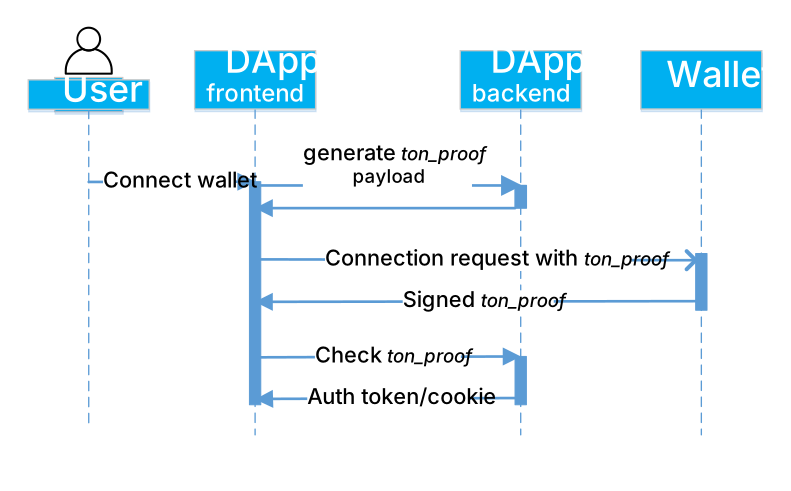
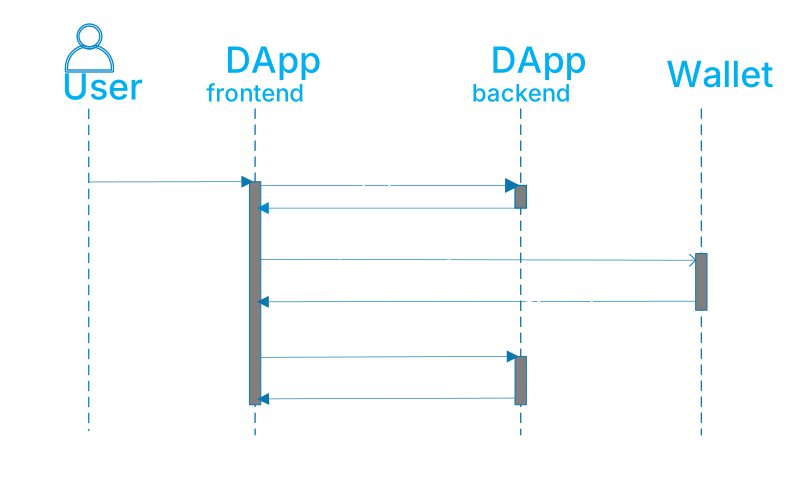
During wallet connection, the SDK exposes a TonProofItemReplySuccess object with this shape. The client sends its proof to the backend:
type TonProofItemReplySuccess = {
  name: 'ton_proof';
  proof: {
    // Unix epoch time of the signing operation in seconds.
    timestamp: number;
    domain: {
      // UTF-8 byte length of the app domain.
      lengthBytes: number;
      // App domain name (URL part, without encoding).
      value: string;
    };
    // Base64-encoded signature.
    signature: string;
    // Payload from the request.
    payload: string;
  };
};
The SDK exposes timestamp as a number, while the TON Connect specification defines its wire value as a decimal string. Backend validation should accept both representations and normalize the value before verification.
Request a proof
Generate an unpredictable, single-use payload on the backend. Store it with a short expiration time and bind it to the browser's login attempt. The backend example returns { payload } — pass that value to the wallet before opening the connection modal.
Save this helper as ton-proof-api.ts in an app using @tonconnect/ui-react:
// Not runnable: add to an @tonconnect/ui-react app and implement the endpoints below.
import type { Account, TonProofItemReplySuccess } from '@tonconnect/ui-react';

export const TonProofApi = {
  async generatePayload() {
    const response = await fetch('/api/ton-proof/payload', { method: 'POST' });
    if (!response.ok) throw new Error('Could not create a login challenge');
    const { payload } = await response.json();
    return { tonProof: payload as string };
  },

  async checkProof(proof: TonProofItemReplySuccess['proof'], account: Account) {
    const response = await fetch('/api/ton-proof/verify', {
      method: 'POST',
      headers: { 'content-type': 'application/json' },
      body: JSON.stringify({
        address: account.address,
        network: account.chain,
        public_key: account.publicKey,
        proof: { ...proof, state_init: account.walletStateInit },
      }),
    });
    if (!response.ok) throw new Error('Wallet proof was rejected; reconnect the wallet');
    return response.json() as Promise<{ address: string; network: string }>;
  },
};
Prepare the request before opening the wallet modal:
// Not runnable: initialize tonConnectUI and import TonProofApi from the helper above.
const payload = await TonProofApi.generatePayload();

tonConnectUI.setConnectRequestParameters({
  state: 'ready',
  value: payload,
});
Keep the payload short. The SDK allows at most 128 UTF-8 bytes for the domain, 128 UTF-8 bytes for the payload, and 222 bytes for both combined.
Read the proof from the wallet status callback. checkProof() maps account.chain to network and account.walletStateInit to proof.state_init. JSON omits public_key when the SDK account has no publicKey.
A wallet that does not support ton_proof returns a connect-item error instead of a proof field, so handle both variants:
// Not runnable: initialize tonConnectUI and import TonProofApi from the helper above.
tonConnectUI.onStatusChange(async (wallet) => {
  const tonProof = wallet?.connectItems?.tonProof;
  if (!wallet || !tonProof || !('proof' in tonProof)) {
    return;
  }

  try {
    await TonProofApi.checkProof(tonProof.proof, wallet.account);
  } catch (error) {
    console.error(error);
  }
});
Verify the signature
To verify, reconstruct the same message the wallet signed and check the signature against it.
Message assembly
Assemble the message exactly as the wallet did:
message = utf8_encode("ton-proof-item-v2/") ++
          Address ++
          AppDomain ++
          Timestamp ++
Payload- Address — the user's wallet address:
workchain(32-bit signed, big-endian) +hash(256-bit unsigned, big-endian). - AppDomain —
lengthBytes(32-bit unsigned, little-endian) + the UTF-8-encoded app domain. Verify thatlengthBytesequals the encoded domain's byte length. - Timestamp — 64-bit little-endian Unix epoch time in seconds.
- Payload — the exact UTF-8-encoded payload from the request. Use a backend-issued, single-use value to prevent replay attacks.
Signature verification
The signing digest is sha256(0xffff ++ utf8_encode("ton-connect") ++ sha256(message)):
signature = Ed25519Sign(
  privkey,
  sha256(0xffff ++ utf8_encode("ton-connect") ++ sha256(message))
)
The backend hashes the message, prepends 0xffff ++ "ton-connect", hashes again, and verifies with the user's public key. Mainnet and testnet use the empty signature domain. Other global IDs use the corresponding L2 signature domain.
Obtain the public key
From walletStateInit (preferred)
For a standard wallet with a known fixed-key data layout, extract the public key from walletStateInit in TonAddressItemReply:
- Parse
walletStateInitas aStateInitcell. - Match its
codehash to a supported wallet version. - Parse the
datacell for that version and read its public key.
From on-chain get_public_key (fallback)
For WalletTg, match the trampoline hash in walletStateInit, then require the live account to be active and its code hash to match the same trampoline. Only then call get_public_key() and use the returned current signing key. Reject inactive accounts, a code mismatch, or a failed getter. A key getter alone does not establish that the connected account is WalletTg.
For non-standard wallets, validate their active code against an allowlist of reviewed implementations before using get_public_key().
Final checks
Before accepting the proof:
- Derive the account address from its
walletStateInitand require it to equal the connected address. - Use
walletStateInitfor a supported fixed-key wallet orget_public_key()for WalletTg to select the proof-verification key. If the SDK account includespublicKey, require it to equal that key. The SDK exposes this field as optional, although the protocol'sTonAddressItemReplytype requires it. Its absence does not invalidate a proof verified with a key resolved from trusted wallet data. - Verify the proof signature with that validated public key.
- Require the domain to equal the expected dApp domain and
lengthBytesto equal its UTF-8 byte length. - Require the timestamp to be within a short acceptance window, say, up to 10 minutes.
- Require the payload to belong to this login attempt, remain unexpired, and be consumed atomically so it cannot be reused.
- Require the connected network to match a TON network accepted by the application. The
ton_proofsignature does not enforce the network.
Public-key extraction is wallet-version-specific. Identify the wallet by its code hash and parse the matching data layout, or validate its active code before calling a key getter.
React example
The following component uses ton-proof-api.ts from Request a proof. Place it inside TonConnectUIProvider, alongside a TonConnectButton. It refreshes the challenge while disconnected and authenticates a new connection. A restored wallet connection does not establish a backend session — reconnect to request a fresh proof.
// Not runnable: add the helper above and render inside TonConnectUIProvider.
import { useEffect, useState } from 'react';
import { useTonConnectUI } from '@tonconnect/ui-react';
import { TonProofApi } from './ton-proof-api';

export const TonProofDemo = () => {
  const [authorized, setAuthorized] = useState(false);
  const [error, setError] = useState('');
  const [tonConnectUI] = useTonConnectUI();

  useEffect(() => {
    let disposed = false;
    let preparing = false;
    let statusVersion = 0;

    const prepare = async () => {
      if (preparing || tonConnectUI.connected) return;
      preparing = true;
      tonConnectUI.setConnectRequestParameters({ state: 'loading' });
      try {
        const payload = await TonProofApi.generatePayload();
        if (!disposed) {
          tonConnectUI.setConnectRequestParameters({ state: 'ready', value: payload });
        }
      } catch {
        if (!disposed) {
          tonConnectUI.setConnectRequestParameters(null);
          setError('Could not create a login challenge');
        }
      } finally {
        preparing = false;
      }
    };

    const unsubscribe = tonConnectUI.onStatusChange(async (wallet) => {
      const version = ++statusVersion;
      setAuthorized(false);
      setError('');
      if (!wallet) {
        void prepare();
        return;
      }
      const item = wallet.connectItems?.tonProof;
      if (!item || !('proof' in item)) {
        setError('Reconnect with a wallet that supports ton_proof');
        return;
      }
      try {
        await TonProofApi.checkProof(item.proof, wallet.account);
        if (!disposed && version === statusVersion) setAuthorized(true);
      } catch {
        if (!disposed && version === statusVersion) setError('Proof rejected; reconnect to try again');
      }
    });

    void prepare();
    const timer = setInterval(prepare, 9 * 60 * 1000);
    return () => {
      disposed = true;
      unsubscribe();
      clearInterval(timer);
    };
  }, [tonConnectUI]);

  return <p>{error || (authorized ? 'Authenticated' : 'Connect a wallet to authenticate')}</p>;
};
Backend example
The following examples follow the SDK demo backend. They depend on @ton/ton, @ton/crypto, and zod NPM packages.
Save the schema and service in the indicated files. Copy the SDK's wallet parsing helpers, including wallets-data.ts and its wallet-contract-v4-r1.ts dependency, into wrappers/.
Proof request schema
// Not runnable: save as dto/check-proof-request-dto.ts and install zod.
import zod from 'zod';

export const CheckProofRequest = zod.object({
  address: zod.string(),
  network: zod.string().regex(/^-?\d+$/),
  public_key: zod.string().regex(/^[0-9a-fA-F]{64}$/).optional(),
  proof: zod.object({
    timestamp: zod.coerce.number().int().nonnegative(),
    domain: zod.object({
      lengthBytes: zod.number(),
      value: zod.string(),
    }),
    payload: zod.string(),
    signature: zod.string(),
    state_init: zod.string(),
  }),
});

export type CheckProofRequestDto = zod.infer<typeof CheckProofRequest>;
Proof verification service
// Not runnable: save as services/ton-proof-service.ts and add the DTO and parsing helpers.
import { getSecureRandomBytes, sha256 } from '@ton/crypto';
import {
  Address,
  Cell,
  contractAddress,
  domainSignVerify,
  loadStateInit,
  TonClient4,
  type SignatureDomain,
  type StateInit,
} from '@ton/ton';
import { Buffer } from 'buffer';
import { CheckProofRequestDto } from '../dto/check-proof-request-dto';
import { tryParsePublicKey } from '../wrappers/wallets-data';

const tonProofPrefix = 'ton-proof-item-v2/';
const tonConnectPrefix = 'ton-connect';
// 10 minutes.
const validAuthTime = 10 * 60;
const walletTgTrampolineCodeHash = '9149ae51c1e4689710cebf7830297b16acfbadb363a920a537893e7ffeeca768';
// Add only reviewed wallet implementations whose getter returns their signing key.
const additionalWalletCodeHashes = new Set<string>();

function publicKeyFromUint256(value: bigint): Buffer {
  if (value < 0n || value >= (1n << 256n)) {
    throw new Error('Invalid public key getter result');
  }
  return Buffer.from(value.toString(16).padStart(64, '0'), 'hex');
}

async function getWalletTgPublicKey(
  client: TonClient4,
  address: Address,
  stateInit: StateInit,
): Promise<Buffer> {
  if (stateInit.code?.hash().toString('hex') !== walletTgTrampolineCodeHash) {
    throw new Error('StateInit is not WalletTg');
  }

  const provider = client.provider(address, null);
  const account = await provider.getState();
  if (account.state.type !== 'active' || !account.state.code) {
    throw new Error('Address is not an active WalletTg account');
  }

  const code = Cell.fromBoc(account.state.code);
  if (
    code.length !== 1 ||
    code[0].hash().toString('hex') !== walletTgTrampolineCodeHash
  ) {
    throw new Error('Active account code is not the WalletTg trampoline');
  }

  const { stack } = await provider.get('get_public_key', []);
  return publicKeyFromUint256(stack.readBigNumber());
}

async function getWalletPublicKey(client: TonClient4, address: Address): Promise<Buffer> {
  const provider = client.provider(address, null);
  const account = await provider.getState();
  if (account.state.type !== 'active' || !account.state.code) {
    throw new Error('Address is not an active supported wallet account');
  }
  const code = Cell.fromBoc(account.state.code);
  if (code.length !== 1 || !additionalWalletCodeHashes.has(code[0].hash().toString('hex'))) {
    throw new Error('Unsupported active wallet code');
  }
  const { stack } = await provider.get('get_public_key', []);
  return publicKeyFromUint256(stack.readBigNumber());
}

function signatureDomain(network: string): SignatureDomain {
  return network === '-239' || network === '-3'
    ? { type: 'empty' }
    : { type: 'l2', globalId: Number(network) };
}

export class TonProofService {
  /** Generate random bytes for the payload. */
  public async generateRandomBytes(): Promise<Buffer> {
    return await getSecureRandomBytes(32);
  }

  /**
   * Verify the ton_proof payload.
   * Reference: https://github.com/ton-blockchain/ton-connect/blob/main/spec/connect.md#address-proof-signature-ton_proof
   */
  public async checkProof(
    payload: CheckProofRequestDto,
    client: TonClient4,
    expectedDomain: string,
  ): Promise<boolean> {
    try {
      const stateInit = loadStateInit(
        Cell.fromBase64(payload.proof.state_init).beginParse(),
      );
      const wantedAddress = Address.parse(payload.address);

      // Validate the address independently of the key used to verify the proof.
      const address = contractAddress(wantedAddress.workChain, stateInit);
      if (!address.equals(wantedAddress)) {
        return false;
      }

      const isWalletTg =
        stateInit.code?.hash().toString('hex') === walletTgTrampolineCodeHash;

      // WalletTg's StateInit key can be stale after rotation. Validate its live code,
      // then use the current getter result. Never cache this key between proofs.
      const stateInitPublicKey = isWalletTg ? null : tryParsePublicKey(stateInit);
      const publicKey = isWalletTg
        ? await getWalletTgPublicKey(client, address, stateInit)
        : stateInitPublicKey ?? await getWalletPublicKey(client, address);
      if (publicKey.length !== 32) {
        return false;
      }

      // Compare the SDK account's public key only when supplied.
      if (payload.public_key !== undefined) {
        if (!/^[0-9a-fA-F]{64}$/.test(payload.public_key)) {
          return false;
        }
        const wantedPublicKey = Buffer.from(payload.public_key, 'hex');
        if (!publicKey.equals(wantedPublicKey)) {
          return false;
        }
      }

      if (payload.proof.domain.value !== expectedDomain) {
        return false;
      }

      const domainBytes = Buffer.from(payload.proof.domain.value, 'utf8');
      if (payload.proof.domain.lengthBytes !== domainBytes.length) {
        return false;
      }

      const now = Math.floor(Date.now() / 1000);
      if (Math.abs(now - payload.proof.timestamp) > validAuthTime) {
        return false;
      }

      const message = {
        workchain: address.workChain,
        address: address.hash,
        domain: {
          lengthBytes: payload.proof.domain.lengthBytes,
          value: payload.proof.domain.value,
        },
        signature: Buffer.from(payload.proof.signature, 'base64'),
        payload: payload.proof.payload,
        stateInit: payload.proof.state_init,
        timestamp: payload.proof.timestamp,
      };

      const wc = Buffer.alloc(4);
      wc.writeInt32BE(message.workchain, 0);

      const ts = Buffer.alloc(8);
      ts.writeBigUInt64LE(BigInt(message.timestamp), 0);

      const dl = Buffer.alloc(4);
      dl.writeUInt32LE(message.domain.lengthBytes, 0);

      // message = utf8_encode("ton-proof-item-v2/") ++ Address ++ AppDomain ++ Timestamp ++ Payload
      const msg = Buffer.concat([
        Buffer.from(tonProofPrefix),
        wc,
        message.address,
        dl,
        domainBytes,
        ts,
        Buffer.from(message.payload, 'utf8'),
      ]);

      const msgHash = Buffer.from(await sha256(msg));

      // signature = Ed25519Sign(privkey, sha256(0xffff ++ utf8_encode("ton-connect") ++ sha256(message)))
      const fullMsg = Buffer.concat([
        Buffer.from([0xff, 0xff]),
        Buffer.from(tonConnectPrefix),
        msgHash,
      ]);

      const result = Buffer.from(await sha256(fullMsg));

      return domainSignVerify({
        data: result,
        signature: message.signature,
        publicKey,
        domain: signatureDomain(payload.network),
      });
    } catch (e) {
      return false;
    }
  }
}
API endpoints
Use the same two routes as the browser helper:
| Route | Behavior |
|---|---|
POST /api/ton-proof/payload | Store a challenge and return { payload }. |
POST /api/ton-proof/verify | Verify the proof, consume its challenge, create an authenticated session, and return { address, network }. |
Use the app's existing session mechanism to identify the pending login attempt on both requests. The attempt ID must come from trusted server-side session state, such as a session identified by a Secure, HttpOnly cookie. Never take it from the proof body. For browser requests, require the dApp's expected origin. The browser helper uses same-origin URLs and sends the session cookie automatically.
The handler functions below leave HTTP routing and session storage to the app. createSession must establish the authenticated session before the response is sent. Use a fresh session ID after authentication, and check that session on every protected endpoint.
// Not runnable: supply the challenge store, server-side login attempt, and session creation.
import { Address, TonClient4 } from '@ton/ton';
import { CheckProofRequest } from './dto/check-proof-request-dto';
import { TonProofService } from './services/ton-proof-service';

// Configure the exact domain and trusted endpoints on the server.
const expectedDomain = 'example.com';
const endpoints: Record<string, string | undefined> = {
  '-239': process.env.TON_MAINNET_ENDPOINT, // toncenter.com
  '-3': process.env.TON_TESTNET_ENDPOINT, // testnet.toncenter.com
};
const service = new TonProofService();

type AccountIdentity = { address: string; network: string };

export interface ChallengeStore {
  // Insert a new challenge; never overwrite an existing payload.
  create(payload: string, attemptId: string, expiresAt: number): Promise<void>;
  // Atomically delete a matching, unexpired challenge; return true only if deleted.
  consume(payload: string, attemptId: string, now: number): Promise<boolean>;
}

export async function generatePayload(store: ChallengeStore, attemptId: string) {
  const payload = (await service.generateRandomBytes()).toString('hex');
  const expiresAt = Math.floor(Date.now() / 1000) + 10 * 60;
  await store.create(payload, attemptId, expiresAt);
  return { payload };
}

export async function checkProof(
  requestBody: unknown,
  attemptId: string,
  store: ChallengeStore,
  createSession: (account: AccountIdentity) => Promise<void>,
): Promise<AccountIdentity> {
  const body = CheckProofRequest.parse(requestBody);
  const endpoint = endpoints[body.network];
  if (!endpoint) throw new Error('Unsupported network');

  const client = new TonClient4({ endpoint });
  if (!(await service.checkProof(body, client, expectedDomain))) {
    throw new Error('Invalid proof');
  }

  const now = Math.floor(Date.now() / 1000);
  if (!(await store.consume(body.proof.payload, attemptId, now))) {
    throw new Error('Login challenge expired, was already used, or belongs to another attempt');
  }

  const account = {
    address: Address.parse(body.address).toRawString(),
    network: body.network,
  };
  await createSession(account);
  return account;
}
Implement consume() as one atomic operation. A separate read followed by a delete allows concurrent requests to reuse the challenge. For example, a PostgreSQL or SQLite store can use this table and these parameterized statements:
CREATE TABLE ton_proof_challenges (
  payload text PRIMARY KEY,
  attempt_id text NOT NULL,
  expires_at bigint NOT NULL
);-- Not runnable: bind $1 to payload, $2 to attemptId, and $3 to expiresAt.
INSERT INTO ton_proof_challenges (payload, attempt_id, expires_at)
VALUES ($1, $2, $3);-- Not runnable: bind $1 to payload, $2 to attemptId, and $3 to the current Unix time.
DELETE FROM ton_proof_challenges
WHERE payload = $1 AND attempt_id = $2 AND expires_at > $3
RETURNING payload;Return true from consume() only when the statement returns one row. The primary key and atomic delete allow at most one request to succeed, including across server processes. Expired challenges can be deleted periodically. Failed signature verification leaves the challenge available until expiration; a failure after consumption requires a new challenge.
Verification examples in other languages
Community examples
The following examples were created by the community — they may be out of date or unsuitable for production. Proceed with caution. Always test thoroughly on testnet before using real funds.